
Pregnancy + | Tracker App
Philips Electronics UK LimitedParenting
4.821.30K Reviews
- Version
- 7.9.1
- Installs
- 50.00M
- Age Rating
- Everyone 10+
Screenshots

Our Review of Pregnancy + | Tracker App
 Analysis by Appyee
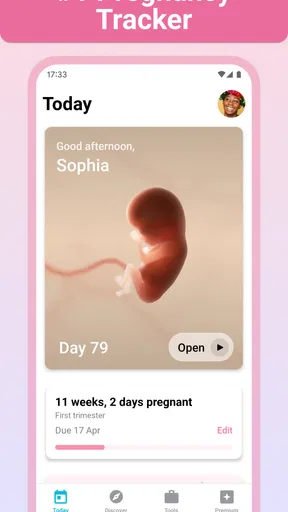
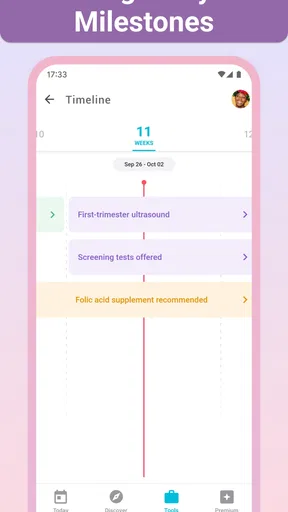
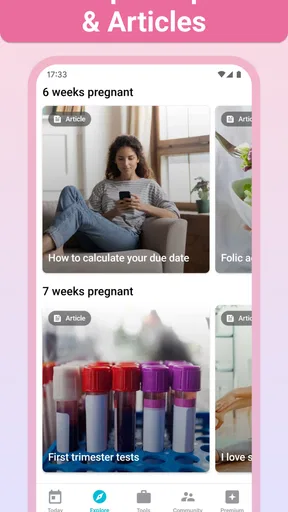
Pregnancy can turn ordinary moments into a stream of questions: Is this change expected? What should I be paying attention to this week? I find Pregnancy + most useful as a way to give those questions some structure. Its weekly development tracker is the feature that shapes the experience: it connects a pregnancy timeline with explanations of what may be happening, so the app feels less like a collection of disconnected articles and more like a guide you can return to as the weeks pass.
A weekly view that gives the information a rhythm
Pregnancy information is easy to find online, but searching every new symptom or milestone can produce a confusing mix of detail and reassurance. A week-by-week tracker offers a more manageable starting point. Rather than asking you to work out which general advice applies to your stage, it puts the current point in the pregnancy front and center and pairs that context with baby development and changes to your body.
That organization is the practical strength. I can imagine checking the app during a quiet moment, reading a short explanation, and then closing it without falling into a long search spiral. The 3D imagery gives the weekly material a visual anchor, while the accompanying descriptions provide context that a picture alone could not. The images are illustrative, not a view of an individual baby, so I’d treat them as a way to picture development rather than as a precise representation.
Setting a due date is the step that makes the timeline personal. It gives the weekly material a place to begin and makes the app easier to use as an ongoing reference instead of a generic pregnancy library. I would still check that the date is entered correctly: a misplaced date can make otherwise helpful week-based information feel out of step. If your care team later adjusts your dating, updating the app keeps its timeline aligned with the information you are using in real life.
How I’d use the tracker day to day
The most sensible routine is a quick weekly check-in, not a demand to open the app several times a day. I’d read the current development notes, choose any article that answers a question I already have, and use the personal tools when they help me prepare. That keeps the experience useful without turning pregnancy into a project with another set of daily tasks to maintain.
For example, after an appointment, I might add a reminder or a note while the conversation is still fresh, then return to the weekly information later when I have time to think. That pairing matters: the tracker helps me understand the broad stage, while notes and appointment details can help me keep my own questions and plans in order. It is a small workflow, but it can make a busy week feel less scattered.
I would also use the reading as a prompt for questions, not as a replacement for a clinician. Pregnancy is individual, and a general week-by-week explanation cannot account for someone’s history, symptoms, or care plan. If something feels urgent or worrying, contacting a qualified professional is a better next step than looking for certainty in an app. The tracker is at its best when it makes information easier to approach, not when it is asked to make medical decisions.
What the wider app adds to the weekly guide
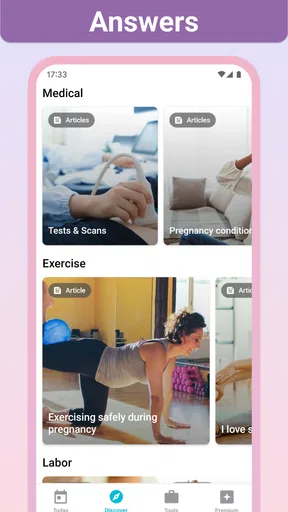
The weekly tracker sits alongside material about the pregnant person’s well-being, practical planning tools, and other ways to explore the journey. That breadth makes Pregnancy + more useful than a simple countdown, although I would not assume that every section needs attention. Its value comes from choosing the parts that fit your current needs rather than trying to keep up with everything it offers.
Useful tools, with a few sensible limits
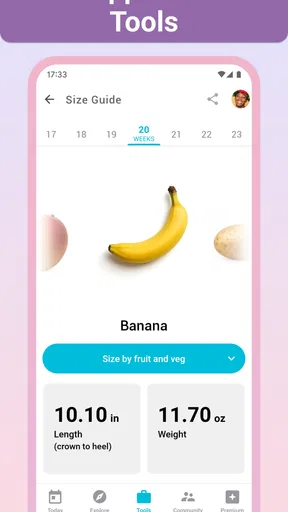
One of the first things I noticed was the weekly development tracker. It offers detailed insights into how your baby is growing, complete with stunning 3D images. It's like having a window into your womb! The app also includes a plethora of information on what's happening with your body each week. It's reassuring to know what to expect and when.
The app isn’t just about your baby, though. It includes a section called "You and Your Pregnancy," which offers tips on nutrition, exercise, and emotional well-being. This holistic approach is a lifesaver, especially when you're navigating the ups and downs of pregnancy hormones.
I’d treat those broader tips as a starting point, not a personal prescription. Advice about food, movement, and emotional health can be useful for thinking of questions to raise at an appointment, but what suits one person may not suit another. A reader who already has specific guidance from a clinician should follow that guidance rather than trying to make it fit a general article.
Personal planning without turning it into homework
One of my favorite features is the ability to customize the app to suit your needs. You can add personal notes, track appointments, and even create a birth plan. Plus, there’s a huge library of baby names if you’re still undecided.
These tools are most helpful when they capture something you would otherwise have to remember. I’d use a note for a question to bring to a visit, for instance, rather than trying to record every passing thought. A birth plan can help organize preferences, but it works best as a conversation aid: birth can unfold differently from expectations, and a flexible plan is more practical than treating every detail as guaranteed.
The name library is an optional change of pace, not a reason to install a pregnancy tracker by itself. It may be enjoyable when choosing a name is part of the excitement, while parents who have already decided can simply ignore it. That ability to dip into individual tools matters; a broad app is less overwhelming when you do not feel obliged to use every section.
Community and content need a personal filter
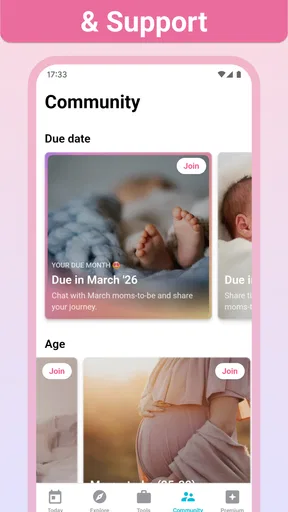
Feeling a bit overwhelmed? The community forum is a great place to connect with other parents-to-be. You can swap stories, share tips, or just vent a little. It’s like a virtual coffee group, right at your fingertips.
Shared experiences can make a person feel less alone, especially when friends or family do not understand the small worries that fill a particular week. At the same time, a forum is made up of individual experiences, not personalized medical advice. I’d visit for conversation and perspective, then separate someone else’s story from what applies to my own pregnancy.
The daily blog can also offer a reason to check in beyond the weekly tracker. I’d choose articles based on a real question or interest rather than feeling pressure to read every post. With any pregnancy content, a calm tone and a clear distinction between general information and individual care matter more than a constant stream of new material.
Where it fits among pregnancy apps
Now, I’ve tried a fair share of pregnancy apps, but Pregnancy + really stands out. The level of detail is impressive, and the visuals are second to none. Plus, the added features like contraction timers and kick counters are genuinely useful when those critical moments arrive.
Compared with a basic week counter, this app gives you more to explore: visual development, body-related reading, planning tools, and a community in one place. That can be a welcome alternative to keeping a separate tracker, notes app, and browsing history. The trade-off is that more content and tools can mean more to sort through. If you only want a simple reminder of how far along you are, a lightweight calendar or a brief conversation with your care team may be a better fit than a larger companion app.
Contraction timing and kick counting are practical tools to have available, but I would use them in line with instructions from a healthcare professional. They can help you record what you notice; they cannot determine by themselves whether a particular pattern is safe or what action you should take. Their presence is convenient, not a substitute for knowing whom to contact when you have a concern.
Another standout feature is the daily blog. Whether it’s a fun fact about pregnancy or a serious piece on common concerns, there’s always something to learn. It’s like having your own personal pregnancy guru.
I would not expect any app to be the right place for every answer. If an article raises a concern, I’d use it to identify what I want to ask rather than letting a general explanation settle a personal medical question. That distinction is especially helpful when reading late at night: the app can make information easier to browse, but it cannot examine you or know the details of your care.
A realistic routine, and the people who benefit most
Picture a weekday evening after a busy appointment day. You remember one question you meant to ask, but the next visit is not immediately in front of you. Adding it to your notes gives you a place to keep it; checking the weekly guide later can help you put it in context. If you want, you can also look through the material on well-being or use the community to hear how other parents describe their experiences. The useful part is being able to choose one next step, not trying to complete the whole app before bed.
I think the app suits first-time parents who want a visual, week-by-week companion, and people who like keeping reading and planning tools together. It can also help a partner or family member follow the broad timeline, provided they remember that the pregnant person’s experience is individual. Someone who prefers paper notes, wants only a due-date countdown, or finds frequent pregnancy content stressful may be happier with a simpler option—or with no tracker at all.
Before relying on it as a daily tool, I’d check the current week and decide what I actually want from the app: context, a note, a planning aid, or a place to read. That small choice makes a content-rich app feel more manageable. It also helps answer a common practical question: you do not need to use every feature to get value from the weekly guide.
Cost, access, and what to expect
Pregnancy + is a free parenting app from Philips Electronics UK Limited, with in-app purchases listed at prices ranging from $0.99 to $39.99 per item. I’d begin with the free experience and only consider a purchase if a particular option is useful to me; there is no need to treat buying something as part of using a pregnancy tracker. The app is rated for Everyone, has a 4.8 average from around 3.4 million ratings, and has been installed over 50 million times. Those figures suggest that it is widely used, but they do not tell me whether its style will suit a particular person.
It was released on January 28, 2013, and version 7.3 requires Android 8.0 or later. If you are choosing between devices or helping a family member install it, checking that Android requirement first can save time. The app is available on iOS as well, so the practical question is whether the version on your device fits your needs and whether you are comfortable with a feature-rich approach.
What really clinches it for me, though, is the app’s ability to grow with you. As you approach your due date, the app adapts, offering insights into labor and delivery, and eventually, postpartum care. It's like having a friend who sticks with you through thick and thin.
A supportive companion, not a substitute for care
In a world where there’s an app for everything, Pregnancy + manages to rise above the rest. It’s not just a tracker—it's a companion. Whether you're a first-timer or a seasoned parent, this app has something for you. So, if you're looking for a little digital support on your pregnancy journey, give Pregnancy + a try. You might just find it’s the only app you need!
My recommendation is more specific: try it if you want a guided timeline that combines visual development with reading and practical planning, and use the pieces that genuinely reduce friction in your week. Keep your due date and personal notes current, treat community stories as stories, and take health concerns to your care team. If that balance sounds right, the app can be a reassuring companion; if you want a bare-bones counter or find pregnancy content overwhelming, a simpler alternative may serve you better.
Privacy and Permissions
See what permissions an app requests and how it handles your data.
- Identity
- add or remove accounts
- Calendar
- read calendar events plus confidential information, add or modify calendar events and send email to guests without owners' knowledge
- Photos/Media/Files
- read the contents of your USB storage
- Storage
- read the contents of your USB storage
- Camera
- take pictures and videos
- Other
- view network connections, delete all app cache data, full network access, run at startup, reorder running apps, enable app debugging, use accounts on the device, control vibration, prevent device from sleeping, Google Play license check
Verdict
Strengths of Pregnancy + | Tracker App
- Comprehensive week-by-week guides.
- User-friendly interface with intuitive design.
- Customizable reminders for appointments.
- High-quality 3D fetal development images.
- Wide range of expert advice articles.
Limitations of Pregnancy + | Tracker App
- Some features require a premium subscription.
- Frequent ads can be distracting.
- Limited offline access to content.
- No direct communication with medical experts.
- Occasional performance lags on older devices.
Other Releases by Philips Electronics UK Limited
View All
Baby + | Your Baby Tracker
Parenting4.7
Similar Picks in This Category
View All
Family Space
Motorola Mobility LLC.3.9

شرطة الأطفال - مكالمة وهمية
Oub Apps4.1

Findmykids: Parental Control
LETEM LTD4.6

Policía de niños - para padres
Kids police4.7

Pregnancy App
Amila4.9

Pregnancy and Due Date Tracker
Wachanga4.5
You May Also Like
View All


Frequently Asked Questions
What features does the Pregnancy + app offer?
The Pregnancy + app provides a range of features to support expectant mothers, including daily pregnancy tips, personalized daily and weekly information, interactive 3D models, a kick counter, a contraction timer, and a personal diary. It also offers guides on baby names, hospital bag checklists, and newborn essentials to ensure comprehensive support throughout your pregnancy journey.
Is the Pregnancy + app free to use, or are there in-app purchases?
The Pregnancy + app is free to download and use, offering a basic range of features at no cost. However, it also includes in-app purchases that unlock premium features such as additional content, advanced tracking options, and ad-free use. These extras can enhance the overall experience, depending on your needs and preferences.
How accurate is the information provided by the Pregnancy + app?
The Pregnancy + app collaborates with healthcare professionals to ensure that the information provided is accurate and up-to-date. While it offers valuable insights and advice, it is always recommended to consult with a healthcare provider for personalized medical guidance. The app serves as a supplementary resource for expectant parents.
Can I use the Pregnancy + app to track multiple pregnancies or twins?
Yes, the Pregnancy + app allows users to track multiple pregnancies, including twins. It offers tailored content and insights to accommodate the unique aspects of carrying more than one baby. Users can access specific information related to their pregnancy situation, ensuring that the app remains relevant and useful throughout their journey.
Is the Pregnancy + app available in multiple languages?
The Pregnancy + app supports multiple languages, making it accessible to a global audience. Users can select their preferred language within the app settings, allowing them to receive information and updates in a language they are comfortable with. This feature enhances user experience by catering to diverse linguistic needs.
